Play Pokies on your iPad or Tablet PC

- Follow us


Gotta find iPad
The vague feeling where would I have kept it! The nagging thought, where would I have lost it! In case this happens, with the following few simple steps you can enable the location service to locate your iPad in case it gets stolen or misplaced.
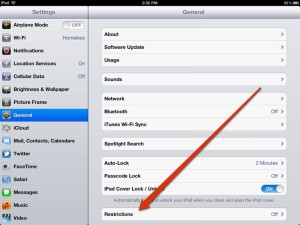
- Go to your settings page.
- Tap on restrictions
- Type the restriction code you had put when enabling the restrictions
Source:ipadinsight
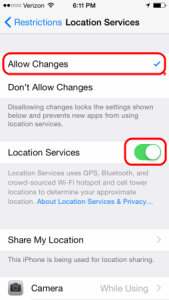
- You will find two sections under it Location and Accounts.
- Go to location tab and you will find two basic options – Allow Changes or Don't Allow Changes.
Source:technipages
- Tap on allow changes and put your ipad on for location services
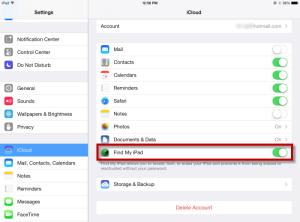
- For double check got to accounts and tap back on allow changes and look at it back on icloud just to make sure you find your iPad is visible.
Source:imobie
- Go back to your restrictions tab and make sure your account is locked.
- Sign in to icloud with your Apple id or iPad id you can see basically the name given to this apple/iPad account on right top corner of screen
- Click on account settings then click on Find my iPad just wait for a moment and it shows up on the screen
- Tap on all devices at top and you can see the list of devices showing up.
You can also locate your device and take additional actions that can help you recover it and keep your data secure.
- Sign in to icloud and under find locate your device. Open Find My iPad, and select a device to view its location on a map. If the device is nearby, you can have it play a sound to help you or someone nearby find it.
- Turn on Lost Mode. Using Lost Mode, you can remotely lock your device with a four-digit passcode, display a custom message with your phone number on your missing device's Lock screen, and keep track of your device's location. This will also suspend your ability to pay through the credit/debit card if you had added on this device.
- You can report your lost or stolen device to local law enforcement.

Copyrights. ©2026 Pokies For iPad and Tablets. All Rights Reserved
- Follow us